
What Is a Meeting Room Booking Panel? 7 Benefits for Smart Offices
Meeting room booking panels are smart display systems that show room availability and simplify reservations in corporate offices. Discover seven key benefits, Microsoft Teams and Google Calendar integration options, installation requirements, and essential selection criteria for modern meeting spaces.
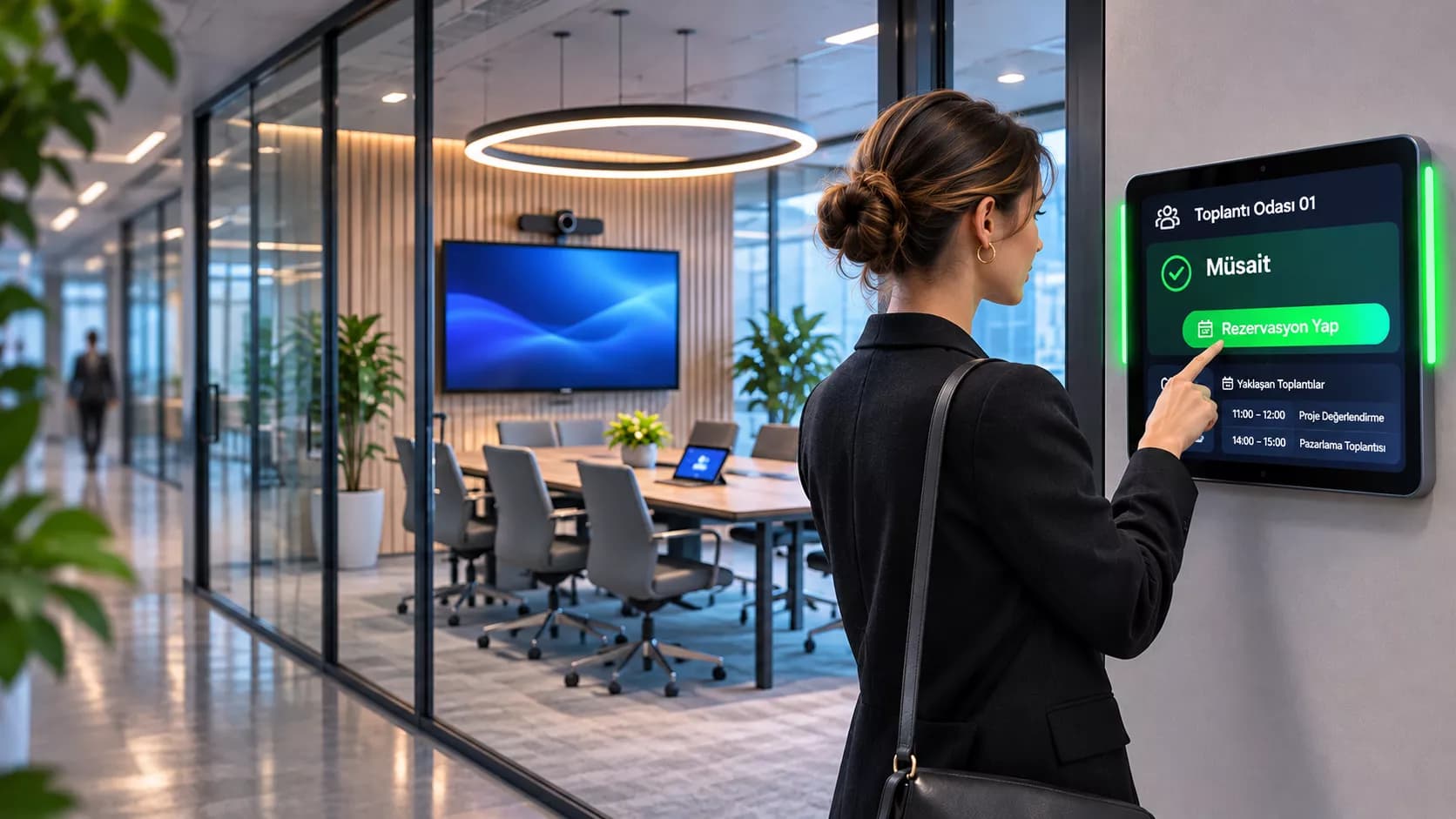
In today's business environment, meetings play an essential role in decision-making, project development, collaboration, and communication between teams. However, managing meeting rooms efficiently is not always easy, particularly in large corporate offices. Double bookings, meeting rooms appearing occupied when they are actually empty, meetings running longer than scheduled, and employees wasting valuable time searching for available spaces are common challenges in modern workplaces.
As hybrid working models become increasingly common, businesses are also facing new requirements for managing their physical office spaces. In organizations where different departments share meeting rooms, employees alternate between remote and office-based work, and virtual meetings take place alongside face-to-face discussions, efficient room scheduling has become an important operational priority. This is where a meeting room booking panel provides a practical technology solution, helping businesses organize meeting spaces and manage reservations more effectively.
Digital room scheduling displays installed outside meeting rooms can show availability, current booking times, and upcoming reservations. Depending on the software and hardware configuration, employees can book available rooms directly from a touchscreen, extend existing meetings, or release rooms they no longer need. Integration with corporate scheduling platforms such as Microsoft Teams, Outlook, and Google Calendar can also help synchronize reservation information across different devices and workplace applications.
So, what is a meeting room booking panel, how does it work, and what benefits does it offer smart offices? How can Microsoft Teams, Outlook, and Google Calendar integrations improve room scheduling? What technical features should businesses consider when choosing the right solution? In this comprehensive guide, we explore how meeting room reservation systems work, examine seven important advantages, explain installation and integration requirements, and discuss the factors that influence pricing.
1. What Is a Meeting Room Booking Panel?
A meeting room booking panel is a professional digital display designed to show room availability, provide scheduling information, and support the management of shared meeting spaces in corporate environments. Also known as a room scheduling display, meeting room reservation panel, or conference room booking panel, these devices are typically installed outside meeting rooms or beside their entrances. Many models feature interactive touchscreens that allow employees to check availability and, when supported by the connected software, create or manage reservations directly from the display.
Meeting room booking panels can show information such as the room name, current reservation status, meeting start and end times, and upcoming bookings. Some devices also include colored LED indicators that make room availability visible from a distance. For example, a green indicator may represent an available room, while a red indicator may show that the room is booked or occupied according to the scheduling system. This allows employees to identify suitable meeting spaces without opening doors or interrupting ongoing discussions. The information displayed can be configured according to the organization's privacy policies and the capabilities of the selected platform.
It is important to understand that a meeting room booking panel is not a complete video conferencing system. Its primary purpose is to manage room scheduling and communicate availability. Professional displays, conference cameras, microphones, speakers, and presentation equipment are separate components that may be integrated into the same meeting space. API Teknoloji's Meeting Room Systems provide an integrated approach to professional displays, audio, connectivity, and control requirements. Room booking panels can be considered as an additional component depending on the project's operational needs.
2. How Does a Meeting Room Booking System Work?
A meeting room booking system generally operates through digital panels connected to a compatible calendar platform or room management application. The first step involves registering the organization's meeting rooms as separate bookable resources within the selected system. Each room can be assigned a name, location, capacity, and, where supported, information about available equipment. Compatible scheduling displays are then associated with the appropriate room calendars, allowing the information shown on each panel to reflect the reservations recorded for that particular space.
For example, an employee may create a meeting through Microsoft Outlook or Microsoft Teams and select an available conference room. The reservation can then appear on the corresponding room booking panel when the system is correctly configured. If another employee attempts to reserve the same room for an overlapping time period, the shared calendar system can help prevent a scheduling conflict. Certain platforms also allow employees to reserve an available meeting space directly from the touchscreen outside the room. Microsoft's official Teams Panels documentation explains functions such as room availability indicators, instant reservations, and meeting schedule management.
Advanced meeting room scheduling systems may support additional features such as check-in confirmation, extending an ongoing reservation, ending a meeting early, and reviewing selected room usage information. Some platforms also offer QR code interactions, occupancy sensor integrations, or automated release of reservations that are not confirmed within a defined period. However, these features are not standard across all booking panels. Device operating systems, software licenses, calendar compatibility, security requirements, and existing corporate infrastructure must be evaluated before selecting a solution.
3. Benefit: Help Prevent Double Bookings and Scheduling Conflicts
One of the most common meeting room management problems in corporate offices is having the same space reserved by different employees or departments at overlapping times. This can happen when reservations are managed through emails, telephone calls, informal arrangements, or manually maintained spreadsheets. When one team arrives for a meeting and discovers that another group is already using the room, valuable working time can be lost. A meeting room booking system helps reduce these conflicts by establishing a shared and structured reservation process.
When room scheduling panels are integrated with a centralized calendar, employees can view the periods during which a meeting room is already reserved and identify available time slots. For example, if a management team has reserved a conference room between 10:00 AM and 11:00 AM, the system should prevent another reservation from being confirmed for the same room during that period, provided all booking requests use the authorized shared calendar. This enables employees to plan meetings with greater visibility and reduces the possibility of conflicting bookings.
Preventing scheduling conflicts can be particularly valuable for organizations where sales, marketing, human resources, operations, and management teams share the same meeting facilities. Each department can plan its activities while considering existing reservations. Nevertheless, calendar-based scheduling cannot completely prevent unauthorized room use, incorrect configurations, or employees occupying a room without creating a reservation. Clear room usage policies and proper system configuration remain important. API Teknoloji can evaluate these requirements as part of its corporate meeting room solutions, helping organizations plan compatible scheduling and meeting technologies.
4. Benefit: Display Real-Time Meeting Room Availability
During a busy working day, employees may waste valuable time walking between different floors or corridors to find an available meeting space. In larger offices, it is not always possible to determine whether a closed meeting room is currently being used. Opening the door to check may interrupt an ongoing meeting. A meeting room availability display addresses this challenge by presenting the room's current scheduling status directly outside the entrance, helping employees identify spaces that may be suitable for their needs.
Booking panels connected to an up-to-date reservation system can display the room name, booking status, and upcoming meeting information through a clear interface. Some models include green and red LED indicators, allowing employees to identify a room's status from a distance. For example, a green light may indicate that the room has no active reservation, while a red light may indicate that the room is currently booked. However, an important distinction should be made: displaying a room's calendar status does not necessarily confirm that people are physically present inside. Actual occupancy detection may require compatible sensors and additional software integration.
Visible room availability information can support faster decision-making for short discussions, unexpected client meetings, and informal team sessions. Employees can identify an available room without repeatedly checking different spaces. Commercial products such as the Logitech Tap Scheduler demonstrate how professional touchscreens and room availability indicators can be combined in a dedicated scheduling device. The actual functionality of each product depends on its software integration, certification, and supported scheduling platform.
5. Benefit: Improve Employee Time Management and Workplace Efficiency
Small delays in meeting management can become significant when repeated throughout a working day. Searching for an available room, checking schedules, contacting colleagues to confirm a reservation, or waiting for a space to become available can all consume time that could otherwise be used for productive work. Meeting room booking panels help digitalize parts of these processes and enable employees to make faster decisions about shared meeting spaces. This can be particularly useful in organizations managing multiple meeting rooms across different floors or departments.
Consider a project team that needs to organize an unexpected fifteen-minute discussion. Instead of starting a lengthy scheduling process, employees may be able to check an available room's booking panel and reserve it for a suitable period, depending on the platform's capabilities. If the meeting finishes earlier than expected, the room may be released through the supported booking interface, allowing other teams to use it. These features depend on how the reservation system manages instant bookings, cancellations, and room release permissions.
The operational value of a meeting room reservation system depends on the organization's existing working practices. A small office with only one meeting room may experience limited benefits, while a large company with numerous shared spaces may find centralized scheduling much more valuable. Businesses should therefore evaluate actual employee needs rather than focusing exclusively on the appearance or specifications of the device. User-friendly interfaces, reliable calendar synchronization, and consistent employee adoption are important factors in achieving meaningful operational improvements.
6. Benefit: Integrate with Microsoft Teams, Outlook, and Google Calendar
Modern organizations commonly manage meetings through digital productivity platforms. Microsoft Teams, Outlook, and Google Calendar enable employees to schedule discussions, invite participants, and organize shared resources. Integrating meeting room booking panels with these systems can allow businesses to incorporate physical meeting spaces into their existing scheduling workflows. Employees can continue using familiar applications while viewing relevant room reservations on the displays installed outside conference rooms. For this reason, calendar integration is one of the most important factors to consider when evaluating a meeting room booking panel.
In the Microsoft Teams ecosystem, compatible and appropriately licensed panels can display meeting room calendars and support functions such as instant booking, future reservations, and meeting extensions, depending on the device and configuration. Microsoft's Teams Panels user guidance provides additional information about room scheduling features. Organizations using Google Workspace can configure meeting rooms as calendar resources, allowing employees to include rooms when creating events. Google's official room booking documentation explains how room resources can be added to events and managed. However, compatibility with one calendar platform does not automatically mean that a panel supports all scheduling services.
API Teknoloji's Meeting Room Systems cover professional meeting technologies designed for corporate environments using platforms such as Microsoft Teams, Zoom, and Google Meet. When a project requires dedicated booking panels, existing calendar infrastructure, device certification, software licenses, and integration requirements should be assessed separately. This helps organizations identify scheduling solutions that work with their established digital workplace environment. Proper integration can also reduce the need for employees to transfer reservation information manually between different systems.
7. Benefit: Support More Efficient Use of Meeting Spaces
In many corporate offices, some meeting rooms appear fully booked even though they are not actually being used. An employee may reserve a room but forget to cancel the booking after the meeting is postponed. Another team may decide to conduct its discussion online without releasing the original physical room reservation. These situations can prevent other employees from using spaces that are effectively available. Meeting room reservation systems can help reduce this inefficiency through suitable booking management features and clearly defined usage policies.
Some advanced room scheduling platforms require employees to confirm their reservation through a check-in process when a meeting begins. Depending on the organization's configuration, reservations that are not confirmed within a specified period may be canceled automatically, making the room available again. Other systems may support early check-out, meeting extension, or integrations with physical occupancy sensors. Microsoft's Teams Panels overview describes scheduling, check-in, and related room management capabilities. The availability of these features depends on the relevant licensing, hardware, and system settings.
More efficient room utilization can help organizations make better decisions about their physical office resources. For example, a business considering the construction of additional meeting rooms may first benefit from analyzing how frequently its existing spaces are reserved and actually used. However, reservation records should not automatically be treated as evidence of physical occupancy. If accurate utilization measurement is required, compatible sensors, appropriate data collection procedures, and privacy safeguards may need to be considered. This approach allows companies to evaluate their meeting facilities based on operational needs rather than assumptions.
8. Benefit: Support Hybrid Work and Modern Meeting Experiences
Hybrid working environments combine office-based collaboration with remote participation. As employees move between physical and virtual workspaces, meeting rooms increasingly function as shared communication environments for people located in different places. Room booking panels can support this arrangement by making physical meeting spaces easier to schedule and manage. However, the booking panel itself does not replace the professional cameras, microphones, speakers, or other equipment required for video conferencing.
For example, imagine a company organizing a meeting between employees based in Istanbul and colleagues working from other cities. The local team may reserve a meeting room through its corporate calendar, review the space's capacity and available equipment, and plan the session accordingly. If the room is equipped with professional displays, conference cameras, microphones, and speakers, remote participants can join through the organization's chosen meeting platform. The booking panel operates as the scheduling and availability component within this broader meeting infrastructure.
API Teknoloji's Meeting Room Systems include professional solutions for video conferencing, presentations, screen sharing, and collaborative communication. Meeting room booking panels can be evaluated alongside these technologies to create an integrated environment. Combining professional audiovisual equipment with appropriately configured scheduling systems can help employees plan their meetings more efficiently while accessing the tools they need for effective collaboration.
9. Benefit: Simplify Centralized Management and Room Usage Reporting
Managing meeting rooms individually can become increasingly complicated as organizations grow. Corporate offices may have numerous rooms distributed across multiple floors, buildings, or cities, each requiring its own scheduling policies, device settings, and access permissions. Meeting room booking systems with centralized administration capabilities can simplify the management of compatible devices and room resources. This can help larger organizations maintain a more structured approach to scheduling and shared workspace management.
Depending on the platform, administrators may configure room names, access permissions, operating hours, device settings, and reservation policies through a management interface. Some systems also provide reports covering booking frequency, popular meeting periods, canceled reservations, and room usage trends. These insights may help organizations understand which meeting spaces experience the greatest demand. However, reporting capabilities differ according to software licenses, platform features, and data collection methods. Reservation data should also be distinguished from actual occupancy when interpreting utilization reports.
Centralized scheduling can be considered alongside an organization's wider digital communication infrastructure. API Teknoloji's Pood Digital Signage supports centralized content management, publishing schedules, and remote updates for compatible professional displays. However, Pood should not be assumed to function as a dedicated meeting room booking system without an appropriate integration. Room reservations, calendar resources, and specialized booking software should be evaluated separately. In suitable projects, dedicated scheduling panels and centrally managed corporate information screens can complement one another within a broader workplace technology strategy.
10. How to Choose, Install, and Budget for a Meeting Room Booking Panel
Selecting the right meeting room booking panel begins with an assessment of the organization's existing calendar and collaboration infrastructure. Businesses using Microsoft 365, Google Workspace, or other enterprise platforms may require different device and software configurations. Important selection criteria include screen size, touchscreen responsiveness, viewing angle, room status indicators, connectivity options, and manufacturer software support. The physical installation location, mounting height, and electrical infrastructure must also be considered. Some professional panels support Power over Ethernet (PoE), allowing power and network connectivity to be delivered through a compatible Ethernet connection, while other devices use separate power supplies. Before purchasing equipment, businesses should confirm software compatibility, applicable certifications, and licensing requirements.
The installation process involves configuring meeting rooms as bookable calendar resources, associating each panel with the correct room, and establishing the necessary user permissions. Network connectivity, internet access, security policies, software licensing, and device management requirements should be planned during implementation. Organizations should also determine how much meeting information will be visible outside each room. For example, some businesses may display meeting titles and organizers, while others may prefer to show only whether a space is available or reserved. Before the system enters regular operation, core functions such as creating reservations, canceling bookings, synchronizing availability, and releasing rooms should be tested according to the supported platform capabilities.
Meeting room booking panel prices vary according to the manufacturer, display specifications, software compatibility, licensing model, installation requirements, and number of rooms. A solution for a single conference room will have different financial and technical requirements from a centralized system managing dozens of rooms across multiple floors. In addition to hardware costs, businesses should consider software subscriptions, network infrastructure, installation, configuration, maintenance, and technical support. API Teknoloji evaluates professional display, connectivity, and systems integration requirements through its Meeting Room Systems. Organizations planning a new installation or upgrading an existing meeting environment can request a project-specific assessment through the API Teknoloji Contact Page.
Frequently Asked Questions About Meeting Room Booking Panels
1. What is a meeting room booking panel?
A meeting room booking panel is a professional digital display that shows room availability and scheduled reservations. When connected to compatible software, employees may be able to view upcoming meetings, reserve available rooms, and manage selected booking functions directly from the panel.
2. What does a meeting room booking panel do?
A meeting room booking panel helps businesses organize shared meeting spaces, reduce scheduling conflicts, and make room availability easier to identify. Integration with a centralized calendar system can also help keep booking information consistent across different devices.
3. Do meeting room booking panels work with Microsoft Teams?
Yes. Compatible devices that meet the relevant Microsoft Teams Panels requirements can operate within the Teams ecosystem. However, hardware certification, supported software versions, and licensing requirements must be verified. Not every room booking panel supports Microsoft Teams directly.
4. Can meeting room booking panels integrate with Outlook and Google Calendar?
Yes. Suitable meeting room scheduling systems can integrate with Microsoft 365 and Google Workspace calendar resources. However, integration capabilities depend on the selected software and hardware. Businesses should choose a solution compatible with their existing corporate calendar infrastructure.
5. Can a meeting room booking panel work without internet access?
This depends on the device and software architecture. Certain panels may continue displaying previously synchronized information during temporary connection interruptions. However, real-time updates and cloud-based calendar synchronization generally require network access. Offline functionality should be verified for each product.
6. What do green and red lights mean on a meeting room booking panel?
Colored indicators are commonly used to communicate room availability. A green light may indicate that the room is available, while a red light may mean it is currently reserved or occupied according to the scheduling platform. The exact meaning of each color depends on the device and its configuration.
7. Is a meeting room booking panel the same as a video conferencing system?
No. A booking panel manages meeting room scheduling and availability, while a video conferencing system provides the equipment and software necessary for audio and video communication. Cameras, microphones, speakers, and professional displays are separate components. Both technologies can be integrated into a comprehensive meeting room solution.
8. How much does a meeting room booking panel cost?
Pricing depends on screen size, manufacturer, hardware features, calendar integrations, software licensing, and installation requirements. Multi-room projects may involve additional centralized management and infrastructure costs. A project-specific assessment is recommended for accurate pricing.
9. Which businesses need meeting room booking panels?
Meeting room booking panels can be useful for corporate offices, business centers, shared workspaces, universities, and organizations managing several meeting rooms. Their value depends on room availability, employee density, and the complexity of existing reservation processes.
10. How can API Teknoloji support meeting room booking panel projects?
API Teknoloji provides corporate solutions in meeting room technologies, professional displays, connectivity infrastructure, and systems integration. For projects requiring booking panels, existing calendar systems, hardware compatibility, software licenses, and installation requirements can be evaluated to identify suitable solutions.
Transform Your Meeting Spaces with API Teknoloji's Smart Office Solutions
Efficient meeting room management is about more than reserving a physical space. Modern corporate offices need convenient access to available meeting rooms, reliable scheduling information, effective collaboration technologies, and manageable infrastructure. Meeting room booking panels can support these requirements by helping organizations establish more structured and efficient workplace operations.
With more than 20 years of industry experience, API Teknoloji provides professional technology solutions in meeting room systems, audiovisual integration, digital signage, interactive kiosks, and centralized display management. From requirements analysis and hardware selection to infrastructure planning, installation, software integration, and technical support, we approach corporate technology projects with a comprehensive perspective.
Whether you want to digitalize meeting room reservations, introduce compatible scheduling panels to your existing Microsoft Teams or corporate calendar environment, or create a modern meeting room infrastructure from the ground up, API Teknoloji can help you evaluate the technology options that best match your operational needs.
Plan Your Professional Meeting Room System
Are you looking to modernize your corporate meeting spaces with professional displays, conference cameras, microphones, audio systems, wireless presentation technologies, and compatible room booking panels?
API Teknoloji can help evaluate the required hardware, software, and integration components to develop a professional meeting environment aligned with your business requirements.
Explore Our Meeting Room Solutions
Request a Quote for Meeting Room Booking Panels and Installation
Share the number of meeting rooms in your organization, your existing calendar platform, any new spaces you are planning, and your technical requirements with our team.
API Teknoloji can assess your project and help identify compatible scheduling panels, professional meeting equipment, software integration options, and the infrastructure required for a reliable installation.
Whether you need a booking display for a single meeting room or want to manage multiple conference spaces across different floors, we can help you evaluate a solution suited to your workplace.
Request a Project-Specific Quote from API Teknoloji
Contact API Teknoloji
Address: Halil Rıfat Paşa Mahallesi, Yüzer Havuz Sokak, No:8/13 Ak Plaza, 34384 Şişli, Istanbul, Türkiye
Phone: 0850 308 0 274
Email: info@apiteknoloji.com.tr
Website: www.apiteknoloji.com.tr
Project Consultation & Quotations: Contact API Teknoloji
Make your meeting rooms smarter, more efficient, and easier to manage with API Teknoloji. Contact our team today to explore professional meeting room and booking panel solutions tailored to your business.
API Teknoloji — Your Technology Partner for Professional Meeting Room Systems and Smart Office Solutions.